

MedSocialCover - Open Graph and X share images for PrestaShop
Facebook, X, LinkedIn and WhatsApp share images for PrestaShop Choose the image shown when your products, categories and pages are shared: one image per element, framed to the format of the networks, and an analysis that shows you what Facebook will really see.









Opis
The problem
Without a module, PrestaShop only gives a share image to the product page, square and without dimensions. The home page, categories, CMS pages and brands have none: Facebook picks one at random in the page, often an icon or a cropped banner.
And when an image exists, it is badly framed: networks show their cards in the 1.91:1 format and cut the top and bottom of a square photo. The theme or another module sometimes adds its own tag: two images compete on the page, and nobody knows which one will be shown.
The solution
MedSocialCover gives an image to every page of the shop. You can choose one per product, category, CMS page, brand, supplier or page such as the home page, and even one per language. Otherwise, the module takes the native image of the element and frames it to 1200 x 630 on a blurred background, without cutting anything.
For each element, the list shows the shared image and where it comes from. The analysis reads your pages like a social network: tags, size, weight, format, duplicate images. If your theme prints its own image, one click keeps only the right one.
How it works
Install
Every page gets an image at once: the framed native image, the default image of the site, or your logo when it is large enough.
Customise
Choose the image of your best products, your categories or the home page by dropping a file in the window of the element, from the module or the product page.
Check
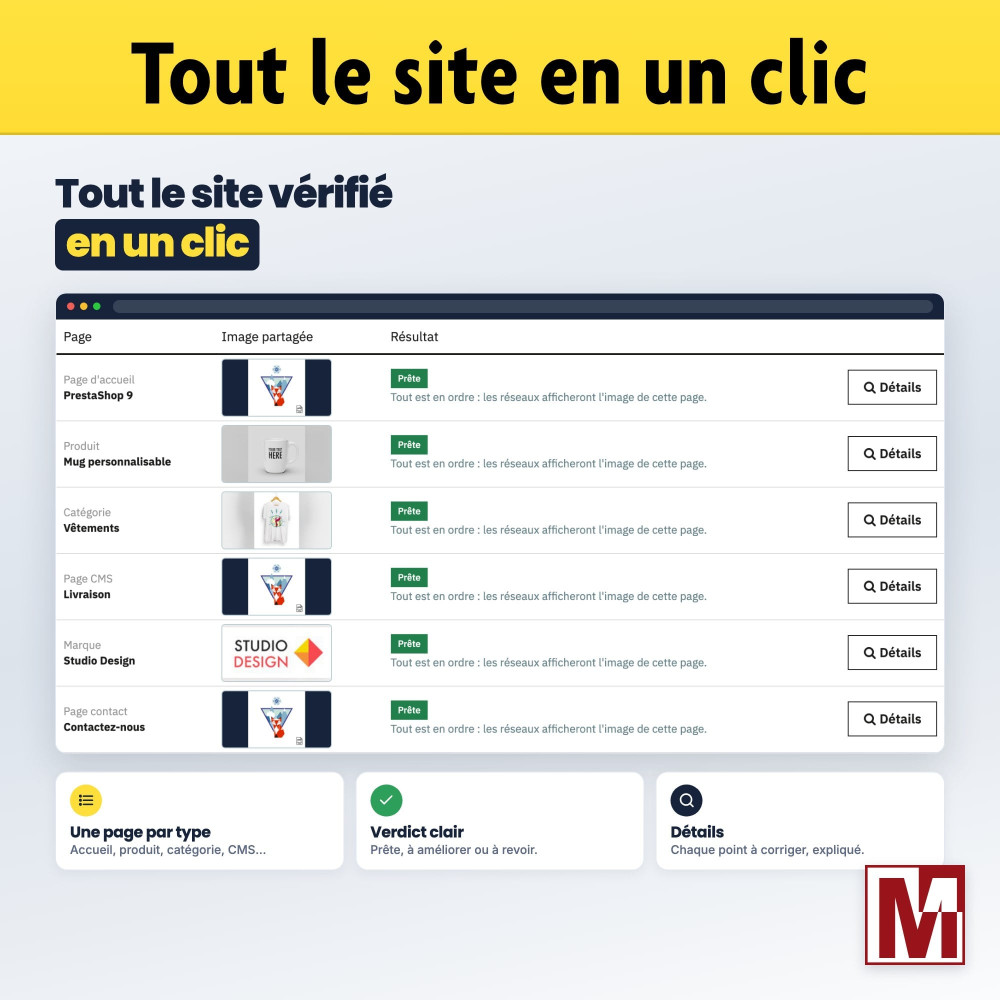
“Check my site” analyses one page of each type and tells you, in plain words, what the networks will show and what is left to fix.
Detailed features
One image per element
- Products, categories, CMS pages and categories, brands, suppliers
- “SEO & URLs” pages: home, contact, new products, module pages
- One image per language or for every language
- One image per shop in multistore
Automatic framing
- Every image becomes a 1200 x 630 JPEG, the format of large cards
- Blurred background, plain background in your colour or full-frame crop
- Native images framed once, then served as they are
- JPEG, PNG, GIF, WebP and AVIF accepted on upload
Always an image
- Own image, then framed native image
- Image inherited from the parent category or CMS category
- Default image of the type, then image of the site
- Shop logo, when at least 200 pixels
Clear management
- Lists with search, sort and paging, without reloading
- Shared image and origin visible for each element
- Drag and drop upload with preview
- Block in the product page of the back office, optional
Page analysis
- Page read the way Facebook does
- Size, ratio, weight and format of the image checked
- Duplicate images detected, cleaned in one click (PrestaShop 1.7.1 and later)
- “Check my site”: one page of each type at once
Facebook, X and the others
- Complete og:image tags: type, width, height, alternative text
- Large X card, X account, title and description of the page
- Colour of the mobile browser bar, optional
- Read by LinkedIn, WhatsApp, Messenger, Telegram, Discord, Slack and Pinterest
Network caches
- A new image gets a new address
- Facebook and LinkedIn pick it up without waiting for their cache to expire
- Direct links to the Sharing Debugger and the Post Inspector
Were you using medfbcover or medtwittercard?
- Settings and default image imported in one click
- Old module uninstalled next, to avoid duplicate tags
- Settings already made in MedSocialCover are kept
Performance and compatibility
MedSocialCover targets PrestaShop 1.6 to 9.x and PHP 5.6 to 8.5, to cover shops not yet migrated. Tags are cached page by page: on a page already seen, the module adds less than a tenth of a millisecond. Saving a product only empties its own cache, which spares shops synchronised with an ERP. A photo too heavy for the memory of the server is replaced by a thumbnail, without ever blocking the page. The module alters no native table, loads no external resource and makes no remote call while your customers browse. Multistore and multilingual, delivered in French, English, German, Spanish, Italian and Polish.
MedSocialCover or a classic Open Graph module?
| PrestaShop alone | Common Open Graph module | MedSocialCover | |
|---|---|---|---|
| Image of the home page, categories and CMS pages | None | Yes | Yes |
| Image framed to the format of the networks | No, cropped square | No | 1200 x 630, three modes |
| Image per language | No | Rarely | Yes |
| Inheritance and default image | No | Partial | Six levels |
| Origin of the image visible | No | No | Yes, for each element |
| Duplicate images | Not handled | Not handled | Detected and removed |
| Page analysis | No | No | Yes |
| PrestaShop 1.6 to 9, PHP 5.6 to 8.5 | - | Varies | Yes |
Comparison made in November 2026 with the Classic and Hummingbird themes of PrestaShop 1.7.8 to 9, and the main Open Graph modules on the market. Those also handle the share title and description per element; MedSocialCover uses the ones of your pages and focuses on the image.
Installation
Install the module from your back office (Modules > Module Manager). When medfbcover or medtwittercard is installed, the module offers to import its settings.
In the “Default images” tab, upload the image of the site and choose the framing mode: blurred background, plain background or crop.
In the “Covers” tab, choose the image of the products, categories and pages that matter most.
In the “Analysis” tab, click “Check my site”: each type of page is checked and the fixes are shown.
Cechy
- Products, categories, CMS pages and categories, brands, suppliers
- “SEO & URLs” pages: home, contact, new products, module pages
- One image per language or for every language
- One image per shop in multistore
- Every image becomes a 1200 x 630 JPEG, the format of large cards
- Blurred background, plain background in your colour or full-frame crop
- Native images framed once, then served as they are
- JPEG, PNG, GIF, WebP and AVIF accepted on upload
- Own image, then framed native image
- Image inherited from the parent category or CMS category
- Default image of the type, then image of the site
- Shop logo, when at least 200 pixels
- Lists with search, sort and paging, without reloading
- Shared image and origin visible for each element
- Drag and drop upload with preview
- Block in the product page of the back office, optional
- Page read the way Facebook does
- Size, ratio, weight and format of the image checked
- Duplicate images detected, cleaned in one click (PrestaShop 1.7.1 and later)
- “Check my site”: one page of each type at once
- Complete og:image tags: type, width, height, alternative text
- Large X card, X account, title and description of the page
- Colour of the mobile browser bar, optional
- Read by LinkedIn, WhatsApp, Messenger, Telegram, Discord, Slack and Pinterest
- A new image gets a new address
- Facebook and LinkedIn pick it up without waiting for their cache to expire
- Direct links to the Sharing Debugger and the Post Inspector
- Settings and default image imported in one click
- Old module uninstalled next, to avoid duplicate tags
- Settings already made in MedSocialCover are kept
Historia wersji
v1.0.0
- Initial version
Projekt, pytanie, audyt?
Osobista odpowiedź w ciągu 24h roboczych. Porozmawiajmy bez zobowiązań.
Porozmawiajmy o Twoim projekcie →