

MedStoreMap - Advanced Store Locator
Display your stores on an interactive Leaflet & OpenStreetMap map — no API key, no fees.


Descrizione
The Problem
Offering a professional store locator typically means integrating Google Maps with a paid API key, complex configuration, and the risk of unexpected billing beyond free quotas.
Without an interactive map, customers cannot visualize where your stores are. A plain text list is not enough to guide them effectively.
The Solution
MedStoreMap displays your PrestaShop stores on an interactive map powered by Leaflet and OpenStreetMap — no API key, no Google account, no cost whatsoever.
In just a few clicks, import your existing stores, customize markers and popups, then embed the map wherever you need it: hooks, shortcodes or a dedicated page.
How It Works
Import Your Stores
Select the PrestaShop stores to display. Import individually or in bulk using checkboxes.
Customize the Display
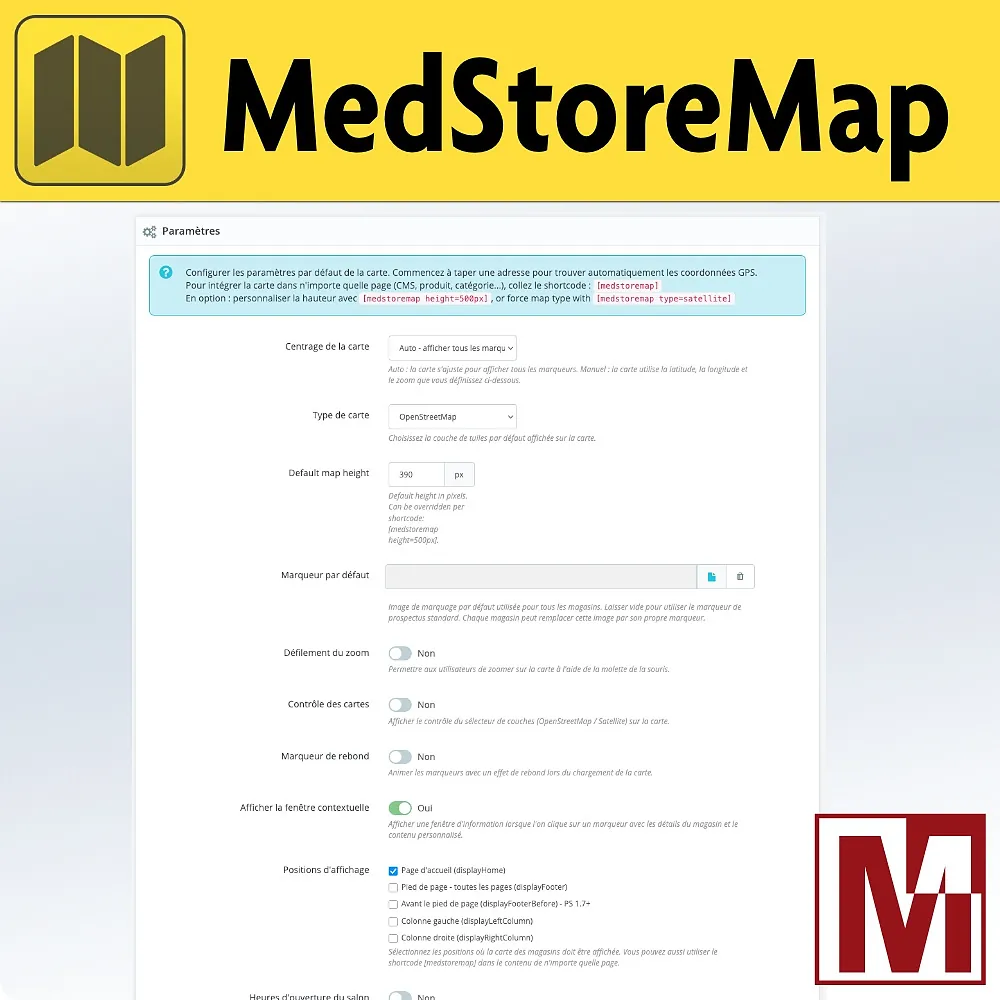
Choose markers, popup design, map height and display positions (hooks or shortcodes).
Map Goes Live
Your visitors locate all your stores with address, phone, opening hours and custom content.
Detailed Features
Interactive Map
- Leaflet 1.9 + OpenStreetMap engine, no API key required
- OpenStreetMap and Satellite views (Esri World Imagery)
- Optional layer switcher control (OSM / Satellite)
- Marker bounce animation on map load
- Scroll zoom toggle (enabled / disabled)
Store Management
- Import from native PrestaShop stores
- Individual or bulk selection (Select all)
- Per-store custom marker or global default marker
- Address geocoding with Nominatim autocompletion
- Automatic or manual map centering
Rich Popups
- Store name, address, clickable phone number
- Native PrestaShop opening hours table
- Custom multilingual HTML content per store
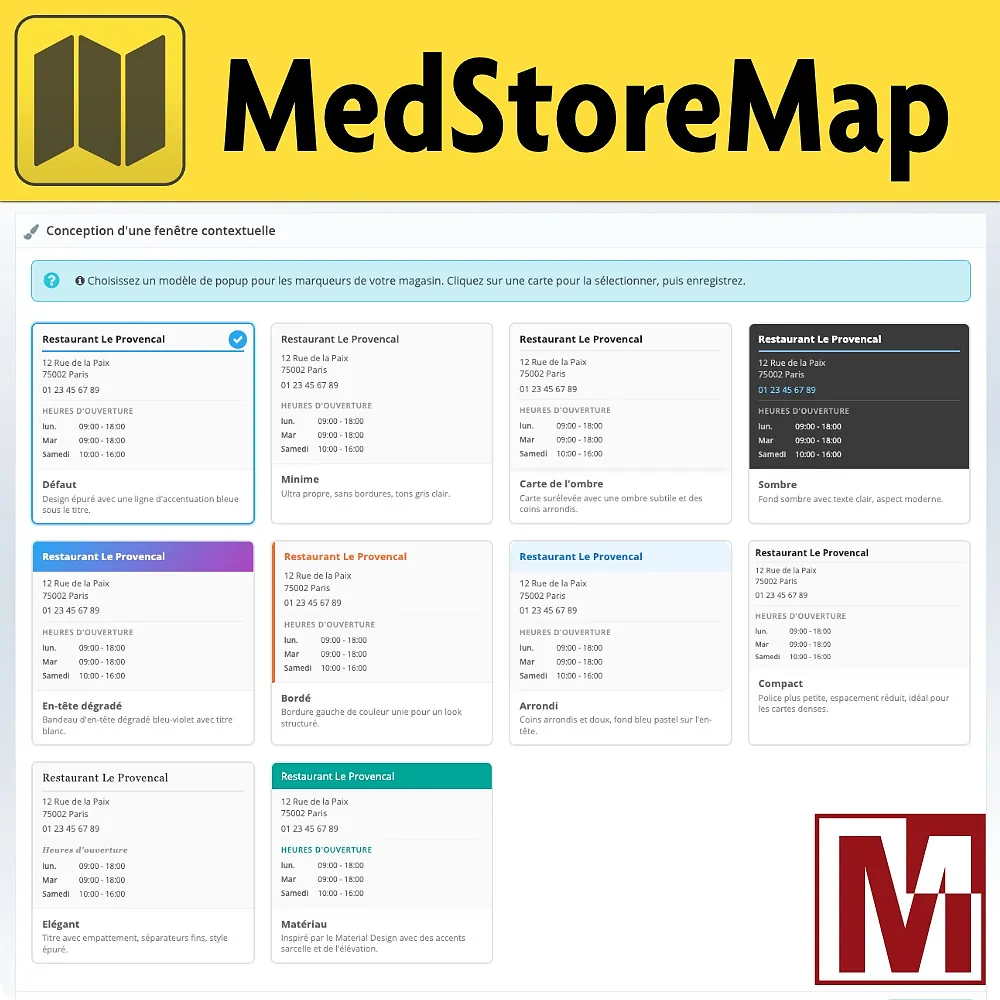
- 10 designs: Default, Minimal, Shadow, Dark, Gradient, Bordered, Rounded, Compact, Elegant, Material
Flexible Integration
[medstoremap]shortcode in any CMS page, product, category, manufacturer or supplier- Per-shortcode
height,typeandidoptions - Multiple independent maps on the same page
- Hooks: home, footer, before footer, left and right columns
Performance
- Assets loaded only on pages that display the map
- Deferred JavaScript (defer) to avoid blocking page render
- Automatic detection of Leaflet already loaded by another module
- Dedicated page
/storemapwith friendly URL
Advanced Configuration
- Map height configurable, overridable per shortcode
- Configurable zoom level and initial map center
- Full multi-shop support
- Compatible with PrestaShop 1.6, 1.7, 8.x and 9.x
Integration Modes
Choose how and where to display the map on your store:
Installation
Download the module and install it from your back office (Modules > Module Manager)
Click Configure to access the module settings
In the Stores tab, import your locations from PrestaShop (individually or in bulk)
Adjust the map settings (centering, zoom, popup design, default marker) and choose your display positions
Caratteristiche
- Leaflet 1.9 + OpenStreetMap engine, no API key required
- OpenStreetMap and Satellite views (Esri World Imagery)
- Optional layer switcher control (OSM / Satellite)
- Marker bounce animation on map load
- Scroll zoom toggle (enabled / disabled)
- Import from native PrestaShop stores
- Individual or bulk selection (Select all)
- Per-store custom marker or global default marker
- Address geocoding with Nominatim autocompletion
- Automatic or manual map centering
- Store name, address, clickable phone number
- Native PrestaShop opening hours table
- Custom multilingual HTML content per store
- 10 designs: Default, Minimal, Shadow, Dark, Gradient, Bordered, Rounded, Compact, Elegant, Material
- [medstoremap] shortcode in any CMS page, product, category, manufacturer or supplier
- Per-shortcode height, type and id options
- Multiple independent maps on the same page
- Hooks: home, footer, before footer, left and right columns
- Assets loaded only on pages that display the map
- Deferred JavaScript (defer) to avoid blocking page render
- Automatic detection of Leaflet already loaded by another module
- Dedicated page /storemap with friendly URL
- Map height configurable, overridable per shortcode
- Configurable zoom level and initial map center
- Full multi-shop support
- Compatible with PrestaShop 1.6, 1.7, 8.x and 9.x
Un progetto, una domanda, un audit?
Risposta personale entro 24h lavorative. Confrontiamoci senza impegno.
Parliamo del tuo progetto →