

Protect and optimize your online store with our PrestaShop database maintenance module
This module offers you many tools to optimize your database, such as cleaning up unused tables. You will be able to schedule automatic maintenance tasks so that you don't have to deal with them manually.By using this module, you can improve the loading speed of your site, reduce latency, and improve the user experience of your customers. Don't hesitate to try it now to enjoy all these benefits!






Description
The Problem
Over time, your PrestaShop store accumulates useless data: outdated connection statistics, abandoned carts, guest accounts without addresses, orphan images, modules uninstalled but still referenced in the database…
This dead weight degrades your site’s performance, slows down the back office, and complicates maintenance. And cleaning up manually via phpMyAdmin is risky, time-consuming, and reserved for experts.
The Solution
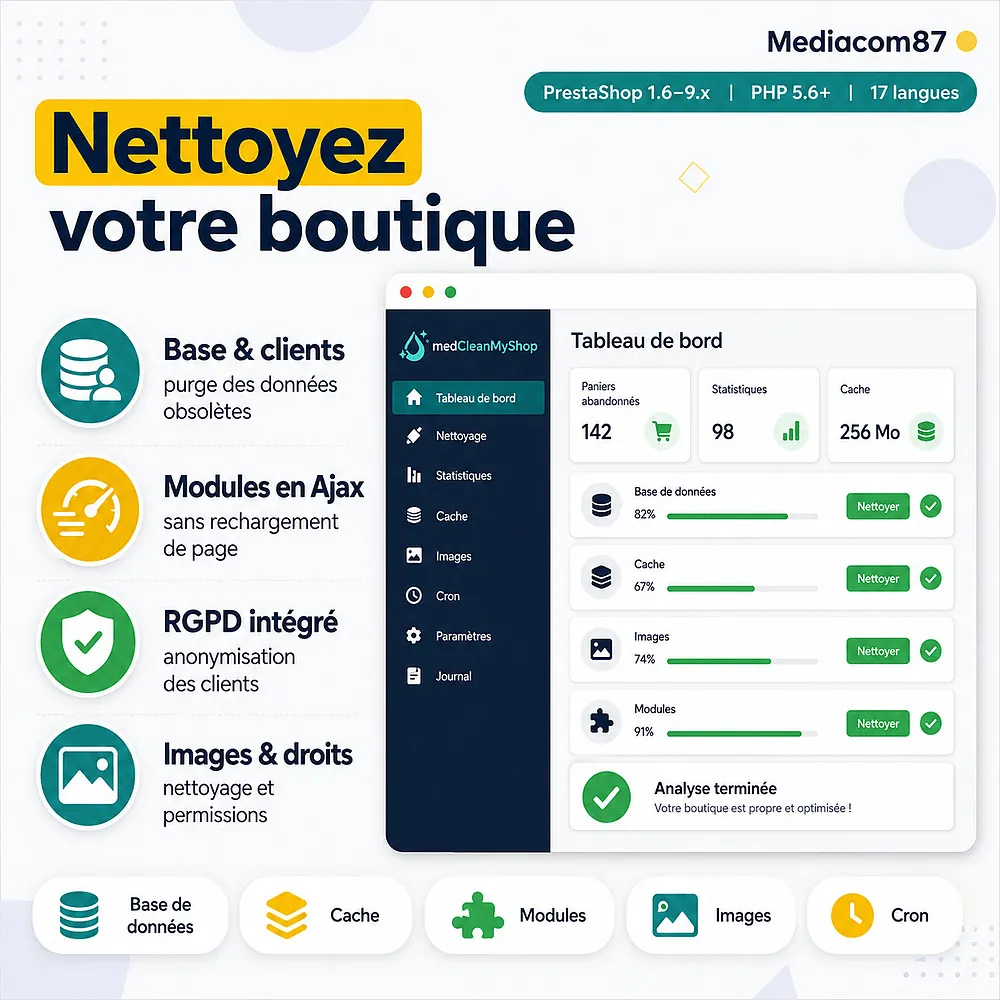
MedCleanMyShop brings together over 40 cleanup and optimization scenarios in a clear, tab-organized interface. Each scenario is explained, secured, and executable in one click.
From purging statistics tables to fixing data consistency, through cache cleanup, images, and modules, everything is automated and configurable via cron tasks.
How It Works
Analysis
The module analyzes your database, files and modules to identify obsolete, orphaned or inconsistent data.
Cleanup
Choose which scenarios to run manually with one click, or automate them through the module’s built-in cron tasks.
Performance
Your store gets its responsiveness back: lighter database, purged cache, normalized files and permissions.
Detailed Features
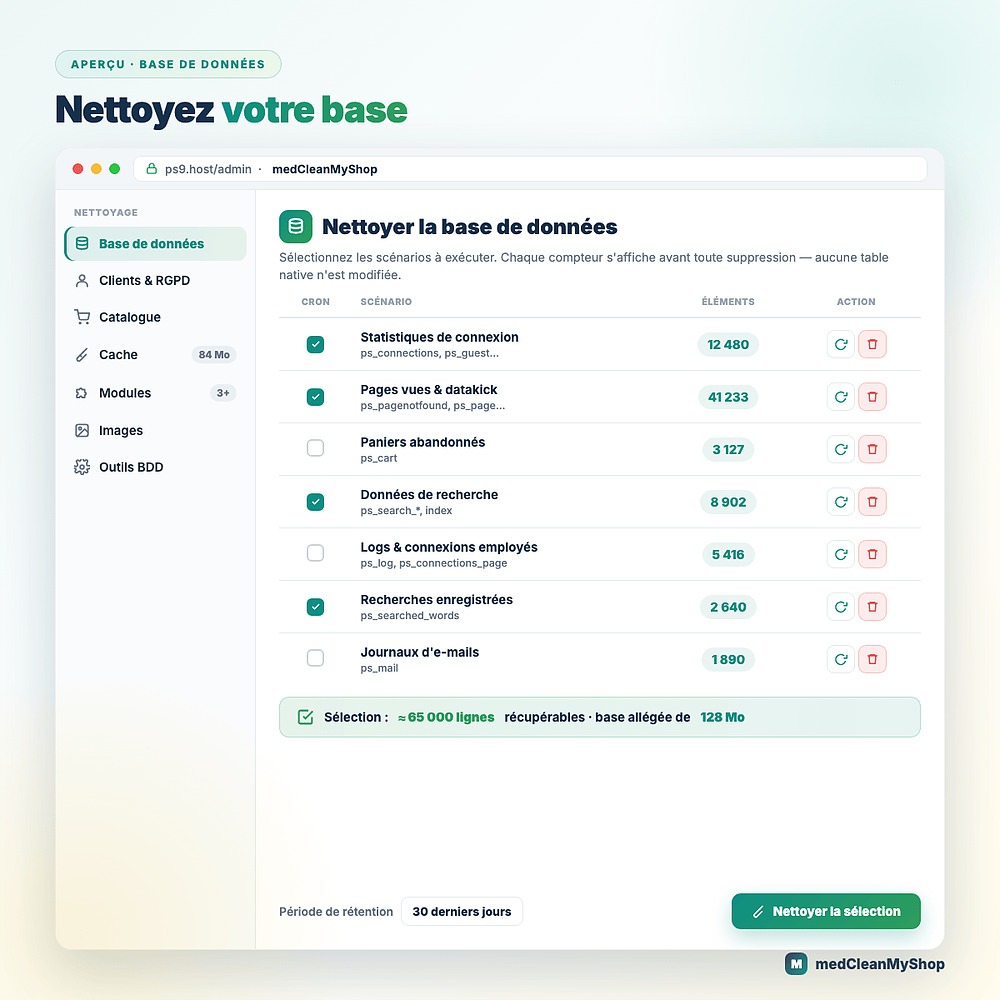
Database Cleanup
- Purge statistics tables (connections, page views, sources, guests…)
- Delete logs and sent emails
- Configurable retention period in days
- Real-time record count per table
Customer Cleanup
- Abandoned shopping carts
- Guests without addresses or orders
- Customers without addresses, orders or deleted customers
- Orphan addresses
- Customer discussion threads (with or without orders)
- Detailed list viewable before deletion
Catalog Cleanup
- Expired specific prices
- Expired or unusable vouchers
- Unused custom feature values
- Each scenario is explained to prevent unintended deletions
Cache Management
- Smarty cache (compilation and cache)
- XML cache and class index
- Symfony prod and dev cache (PS 1.7+)
- Temporary images (img/tmp)
- Cache directory size display
Module Management
- Detection of missing modules (installed in DB but absent from server)
- Database entry cleanup for missing modules
- List of uninstalled modules with author filter
- One-click uninstall, install, delete and ZIP download
- Actions run via Ajax, with no page reload
- Cleanup of residual files and folders in the modules directory
Image Tools
- Detection and deletion of broken images (files missing from disk)
- Detection and deletion of orphan image files (not linked to any product)
- Detailed file list viewable before deletion
Database Tools
- Table prefix change (security)
- Database engine migration to InnoDB
- Category tree recalculation (nleft, nright, level_depth)
- Full customer and order deletion (factory reset)
Data Consistency
- 14 fix scenarios: shops, languages, configuration, native tables, categories, customers, orders, products, carriers, statistics, search, cart rules, modules, invoices
- Automatic detection and correction of inconsistencies
File & Directory Permissions
- Analysis of non-compliant permissions (755 directories / 644 files)
- Bulk or individual correction
- Detailed list of items to fix
GDPR
- Full customer data anonymization (name, email, address, phone, SIRET, VAT…)
- Anonymization of a single customer via search (name, email or ID)
- Counter of customers and addresses to anonymize
- Compliance with regulatory requirements
Cron Task Automation
Each module section provides its own customizable cron URLs. Select which scenarios to include in each task, configure the retention period and schedule automatic execution. A SuperCron mode lets you combine all tasks into a single URL. The last execution date of each task is displayed in the back office.
Installation
Download the module and install it from your back office (Modules > Module Manager)
Access the module configuration — no additional table is created, the module is ready to use
Browse the tabs, review the scenarios and run the cleanups suited to your store
Set up cron tasks to automate the regular maintenance of your store
Features
- Purge statistics tables (connections, page views, sources, guests…)
- Delete logs and sent emails
- Configurable retention period in days
- Real-time record count per table
- Abandoned shopping carts
- Guests without addresses or orders
- Customers without addresses, orders or deleted customers
- Orphan addresses
- Customer discussion threads (with or without orders)
- Detailed list viewable before deletion
- Expired specific prices
- Expired or unusable vouchers
- Unused custom feature values
- Each scenario is explained to prevent unintended deletions
- Smarty cache (compilation and cache)
- XML cache and class index
- Symfony prod and dev cache (PS 1.7+)
- Temporary images (img/tmp)
- Cache directory size display
- Detection of missing modules (installed in DB but absent from server)
- Database entry cleanup for missing modules
- List of uninstalled modules with author filter
- One-click uninstall, install, delete and ZIP download
- Actions run via Ajax, with no page reload
- Cleanup of residual files and folders in the modules directory
- Detection and deletion of broken images (files missing from disk)
- Detection and deletion of orphan image files (not linked to any product)
- Detailed file list viewable before deletion
- Table prefix change (security)
- Database engine migration to InnoDB
- Category tree recalculation (nleft, nright, level_depth)
- Full customer and order deletion (factory reset)
- 14 fix scenarios: shops, languages, configuration, native tables, categories, customers, orders, products, carriers, statistics, search, cart rules, modules, invoices
- Automatic detection and correction of inconsistencies
- Analysis of non-compliant permissions (755 directories / 644 files)
- Bulk or individual correction
- Detailed list of items to fix
- Full customer data anonymization (name, email, address, phone, SIRET, VAT…)
- Anonymization of a single customer via search (name, email or ID)
- Counter of customers and addresses to anonymize
- Compliance with regulatory requirements
Changelog
v3.5.3
- Fixed the backup button with version 2.0 of the backup module: the backup now runs in a progress window, without leaving this module.
- Fixed the error 500 when changing the table prefix: the change now applies, and a prefix that would conflict with existing tables is refused before anything is renamed.
v3.5.1
- Critical fix: opening the detailed list of orphan addresses deleted them instead of only displaying them, so they disappeared before you could review them (versions 3.4.1 to 3.5.0)
- Orphan address analysis and cleanup are now dozens of times faster on large shops: the queries now use the database indexes (about 19 seconds down to 0.3 second on a shop with 185,000 addresses)
- The orphan address counter now applies exactly the same rules as the deletion, so the announced number always matches what is removed
- Fixed an HTTP 500 error on PrestaShop 1.6 when enabling a module from the list: the module called a core method that only exists from PrestaShop 1.7 onwards
- Fixed disabling a module on PrestaShop 1.6 being reported as a failure although it had succeeded; the enabled state is now read back from the shop association after the action
- Fixed module names and descriptions containing HTML entities being escaped twice in the module list, showing the raw entity instead of the accented character
- Fixed an error when changing the database table prefix, caused by a call to a method that had been renamed
- Fixed a fatal error when upgrading the module from a version older than 2.3.0
- Added the missing index.php protection files in the mail template directories
v3.5.0
- Removed the external DataTables library loaded from a CDN: the back-office tables (sorting, search, pagination) are now handled by a bundled offline helper, so no external resource is loaded any more
- Fixed the module list showing every module as enabled on PrestaShop 1.7 and later: the enabled/disabled status is now read from the shop association (like PrestaShop core) instead of the module.active flag, which stays on even for a disabled module
- Modules list: you can now enable or disable an installed module directly from the list
- Modules list: you can now add a module by uploading its .zip archive, like the official PrestaShop module page
v3.4.3
- Critical fix: the consistency-check cleanups could delete rows whose foreign key is NULL or 0 (valid "all shops" markers, such as carrier prices in the delivery table), wrongly treating them as orphans and removing them all; orphan detection now ignores NULL and 0 sentinel values
v3.4.2
- Fixed a 500 error when running SuperCron, caused by a duplicate LIMIT clause in the orphan-address cleanup queries
- Fixed a 500 error (SQL 1093) on SuperCron in the configuration cleanup, caused by a subquery referencing the table being deleted
- Fixed a 500 error (SQL 1054) on SuperCron in the shop/language table cleanup for modules using a non-standard primary key column name
v3.4.1
- Fixed the consistency-correction scenarios that were deleting nothing on some MySQL/MariaDB configurations
v3.3.0
- Added an option to regenerate the category tree structure
- Adding module version management information
- DataTables library updated to version 2.3.6
v3.5.2
- Critical fix: the database structure check emptied the whole stock movement history on shops without advanced stock management (at least since version 3.1.8). This check has been removed. Movements already deleted cannot be recovered.
v3.4.0
- Module actions (uninstall, upgrade, folder/file and module deletion, orphan database cleanup) now run via Ajax without reloading the page; install still reloads the page (PrestaShop 8/9 requirement)
- Added a GDPR scenario to anonymize a single customer, with search by name, email or ID
- New about page with module information, compatibility and feature list
v3.5.4
- Fixed an error 503 when cleaning a visitor table holding several million rows.
- Much faster counting of the visitors to clean, even on very busy shops.
- Large tables are cleaned in fewer steps.
- New: you can now clean the list of pages not found (404 errors) recorded by your shop.
- New: the database tools tab spots the tables keeping space freed by cleanings and gives it back to the disk in one click.
- New: a FAQ tab answers the most common questions about cleaning results, backups and the cron.
v3.1.7
- Minor corrections
v3.1.6
- Added scenarios to correct directory and file access rights
- Add refresh buttons for each scenario, to avoid having to launch all scenarios and reduce server load
v3.2.0
- Add scenario to delete all customers and orders
v3.1.9
- Fixed compatibility bug with versions lower than PHP 7.4
v3.1.8
- Improved table cleaning scenario _lang
- Improved currency control for payment modules
- Improved presentation of certain scenarios and refreshment of the retention period to avoid overloading the server
- Correction of an unlikely case of modules not complying with development guidelines
- Performance enhancement
v3.2.1
- Improved module archiving function
- DataTables library updated to version 2.3.2
v3.1.5
- Corrected processing of coupon dates
v2.3.0
- Add a scenario to reassociate invoices with their original order
- Add a cron job for database repair
- Add a button on each table concerned to launch only the scenarios selected for cron tasks
v3.0.5
- Complete code overhaul to clean up unnecessary product images
- Activate safe scenarios for crontask during module installation
- DataTables library updated to version 2.1.0
v2.5.0
- Added a scenario to correct database tables that do not use the database engine defined in the parameters
- DataTables library updated to version 2.0.2
- Separation of cleaning from Cart Rules for easier processing of large catalogs
- Preserve module list presentation settings between page displays
v3.0.2
- Fixed bug preventing certain scenarios from being deleted from the catalog
- Fixed a bug in the option to uninstall several modules at the same time
- Improved feedback on certain scenarios that can take a long time
- Improved explanations to help with the use of certain scenarios
- DataTables library updated to version 2.0.5
v3.1.4
- Added compatibility with PHP 8.2
v3.0.1
- Fixed a bug when launching SuperCron that did not support all selected scenarios
v3.1.3
- Added compatibility with PrestaShop 9
- Scenarios are calculated when the corresponding tab is displayed, to avoid overloading the server
- Improved module list display
v3.0.4
- Correction of Cron task management for new scenarios
- Add number of tables not using correct database engine
v3.0.3
- Fixed a bug limiting the processing of certain scenarios
- Separation of scenarios to avoid data consistency bottlenecks
- DataTables library updated to version 2.0.7
v2.2.0
- Bug fix on some PrestaShop 1.6 versions
- Fixed problem recalculating real-time scenarios when specifying a delay of 0 days
- Improved module UX
v3.0.0
- On-demand scenario calculation shifted to avoid server overloads
Calculation of the data counters to be cleaned is launched only on the scenarios selected for processing with a Cron task, enabling instant visualization of the volume of data to be cleaned without risk. - Add a button to refresh the calculation only for scenarios programmed on a Cron task
- Added an option to change the database engine for InnoDB
- Add a SuperCron that can launch all Cron tasks with a single URL
- Add an option to mass uninstall all modules that have been deactivated
- Add a filter to display only modules by a specific creator
- Fixed cache issue when changing database table prefix for PrestaShop 1.6
- DataTables library updated to version 2.0.3
v3.1.2
- Added compatibility with the OpartDevis module to avoid deleting baskets linked to quotes.
- Fixed a bug in the display of some buttons
- DataTables library updated to version 2.1.8
v2.4.0
- Improved handling of unused image file deletion scenario for very large catalogs
- Addition of a new scenario for clearing the cache of filters created by PrestaShop's native faceted navigation module
- Improved cache clearing for some older PrestaShop 1.7 versions
- DataTables library updated to version 2.0.1
v3.1.1
- Fixed translation bug on tables
- Fixed processing incompatibility when using pm_advancedsearch4 module
- DataTables library updated to version 2.1.5
v2.1.0
- Scenarios added to correct problems caused by store deletion
- Scenarios added to correct problems caused by language deletion
- Add a scenario to clean up inconsistencies in the configuration table
- Add a scenario to clean up inconsistencies in native tables
- Add a scenario to clean up inconsistencies in native tables linked to modules
v3.1.0
- Correction of a display bug in the list of modules due to some modules having fun in their description
- Add preview of product images to be deleted
- Add an option to delete scenario files one by one concerning files not required for product images
- Add a scenario to automatically delete discount codes that have no date limit but can no longer be used
- DataTables library updated to version 2.1.3
v1.4.1
- Fixed a bug on the display of badges on the tabs
- Added information about the size of the database
- Fixed a bug in the display of information icons in the pages
- Adding the directory in the modules table to identify the module folder copies
v1.4.0
- Added a new option to delete the folders of modules present on the server but not installed
- Added an option to download the archive of a complete module folder, useful before deleting it permanently
- Performance improvement
- Addition on some tabs of the module of the number of erasable data
- Improved security of this module by giving user rights only to SuperAdmin employees
v1.8.1
- Fixed a bug when analyzing installed modules
- Correction of a bug in the deletion scenario for customers considered deleted
- DataTables library updated to version 1.13.5
v1.6.2
- Improved compatibility with PHP8
- Added an option to delete several uninstalled modules at once
- Display the size of the temporary image directory
- Addition of an option facilitating multiple selection for certain scenarios
v1.8.0
- Added option to install a module directly from the module cleaning tab
- Add an option to change the prefix of your database tables
v2.0.0
- Added scenarios for cleaning up product images in the database and files on the server
- Improved processing of deletion scenarios with large results
- Multi-shop support to indicate whether a module is active only on certain stores
- Asynchronous data loading for enhanced user experience
v1.6.0
- Adding the identification of modules absent from the server but active in the database
- Improvement of the design of the tables
- Fixed a bug in the display of information about some scenarios
- Added better presentation of data tables with pagination and search function
- Added cleaning of the revision table created by the Creative Elements module
- Fixed a bug when a table no longer exists after uninstalling the linked module
v1.3.2
- Correction on a defect of saving the configuration of the elements to be integrated in the cron tasks
v1.6.1
- Add a column indicating the creator of each module
- Added an option for cleaning the image cache to empty the img/tmp/ folder
v1.5.0
- Fix bug if statssearch module is uninstalled
- Added a security option by allowing database backup if you have installed my database backup module
v1.7.0
- Improved cleaning procedure for abandoned baskets to avoid errors if there are many to delete
- A new scenario has been added to clean up the modules folder if there are files or folders that don't belong there.
- Improved module UX
- Add an option to uninstall a module
- Integration of module version numbers when downloading modules
- Add last execution date for each Cron task
v1.3.1
- Fixed a bug that prevented to view a thread for the scenario: Customer thread about an order
- Add a better security on SQL queries
- Added more information on how to use the module
v1.3.0
- Add a tab to clear the cache
- Adding a cron job to clear the cache
- Fixed a bug when saving changes in the module configuration
v1.0.0
- Initial version
v1.1.0
- Added an option to display data that can be deleted on certain scenarios to facilitate decision-making
- Adding new scenarios to permanently delete clients that are deleted but still present in the database
- Fixed a bug when deleting customer threads
- Fixed a bug when deleting customer without address
- Improved performance on customer data erasure
- Improved some scenario descriptions to assist in decision-making
v1.2.0
- Added a scenario to anonymize all personal data of customers
- Compatibility with PrestaShop 8.0
- Improvement of the source code of the scenarios
- Separation of service thread scenarios into those associated with an order and others
- Add a scenario to remove addresses that are not associated with any customer, manufacturer, supplier or order
Customer reviews · 18 verified reviews
A project, a question, an audit?
Personal reply within 24 working hours. No strings attached.
Let's discuss your project →