

Control access to your site by country
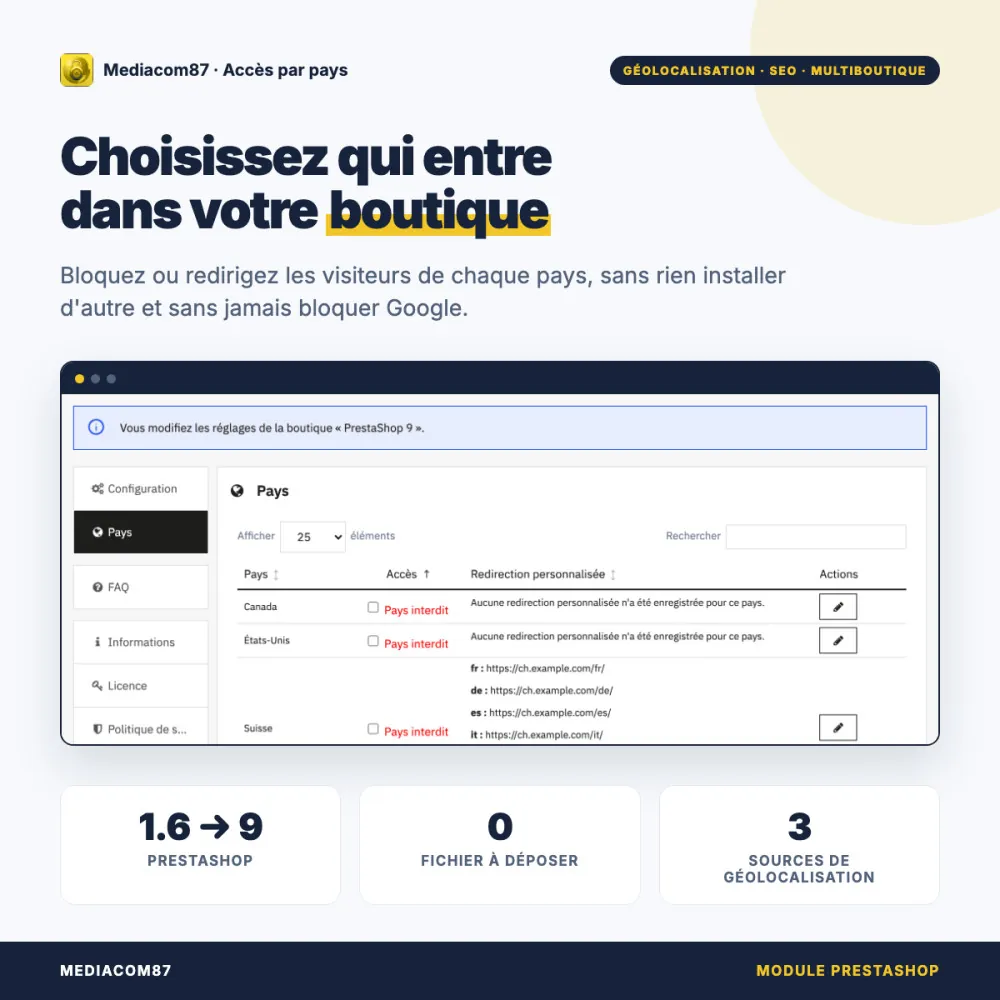
Choose, country by country, who enters your shop One click per country, active right after installation: no file to upload, no account to create, and never blocking search engine crawlers or closing your shop by mistake.




Description
The problem
You do not ship to some countries, you are opening markets country by country, or fraud always comes from the same regions. You then need to filter visitors by country without getting in the way of everyone else.
PrestaShop's native geolocation needs a database you upload by hand and that is never updated, redirects nobody and makes no exception for Google: blocking the United States, where Googlebot crawls from, can cost you your SEO.
The solution
Allow / block access by country works right after installation: one click allows or blocks a country, and a blocked visitor sees a page with your logo or is sent to the address of your choice.
Search engine crawlers always get through, and if a country cannot be determined, access stays open: your shop never closes by mistake.
What sets it apart
Six design choices that make the difference day to day.
Ready right after installation
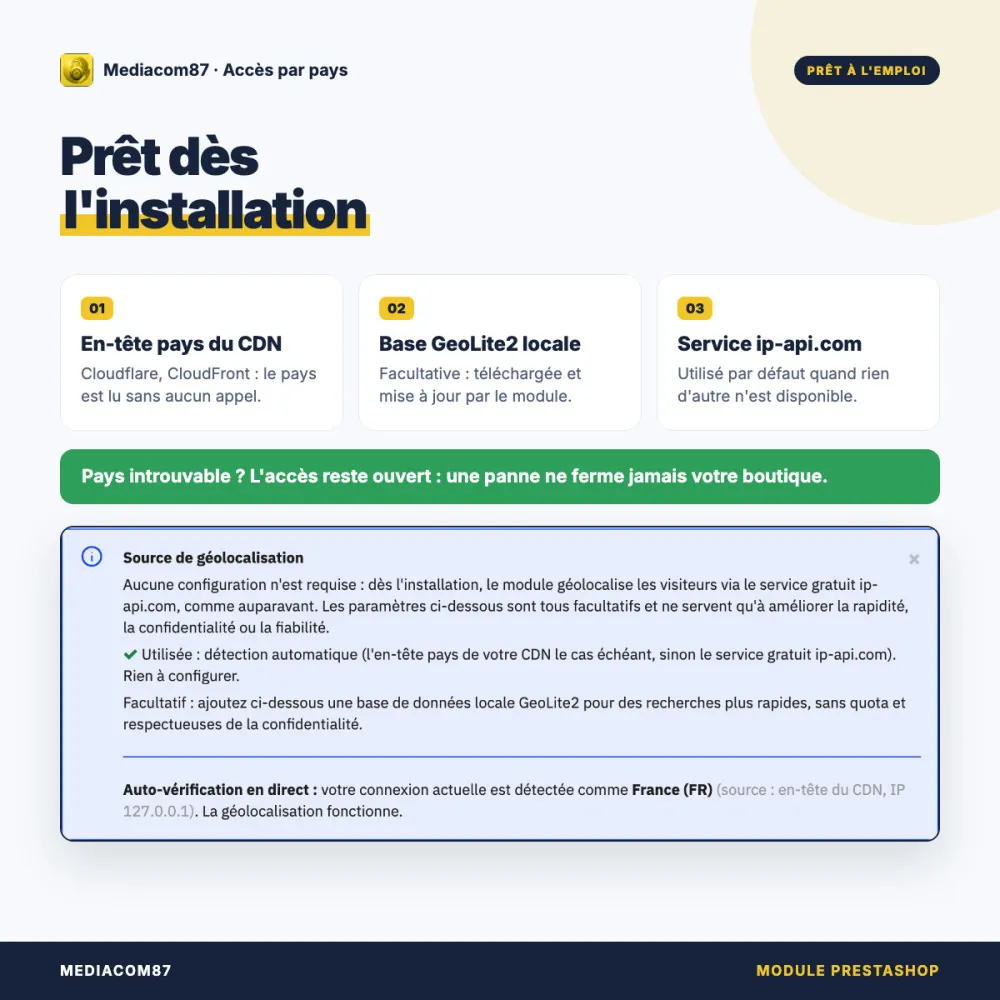
No file to upload, no account to create, no cron job. The module reads your CDN's country header if there is one, otherwise it queries an online service.
Google is never blocked
Crawlers from Google, Bing, AI services and social networks are recognised by the module itself, with no external service, and always get through.
Never closed by mistake
Geolocation service unavailable, quota reached: if the country remains unknown, the visitor gets in. An outage costs you no sales.
A local database kept up to date
With a free MaxMind key, the module downloads the GeoLite2 database and updates it every week: local lookups, no quota, no data sent to a third party.
One response per country and per language
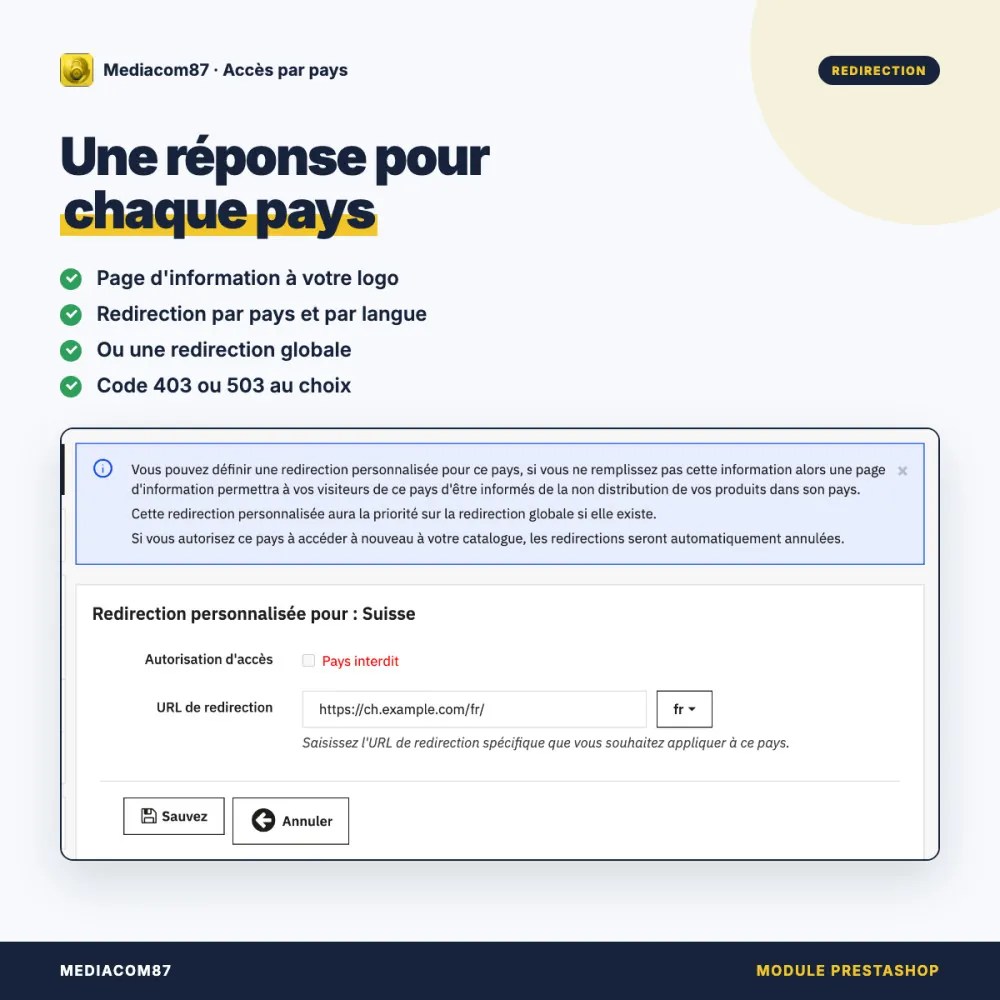
Information page with your logo, redirection specific to each country and each language, or a global redirection. Code 503 or 403, as you choose.
You can see it works
The Configuration tab shows the country detected for your own connection, and the source in use. The FAQ explains how to test blocking.
This module or native geolocation?
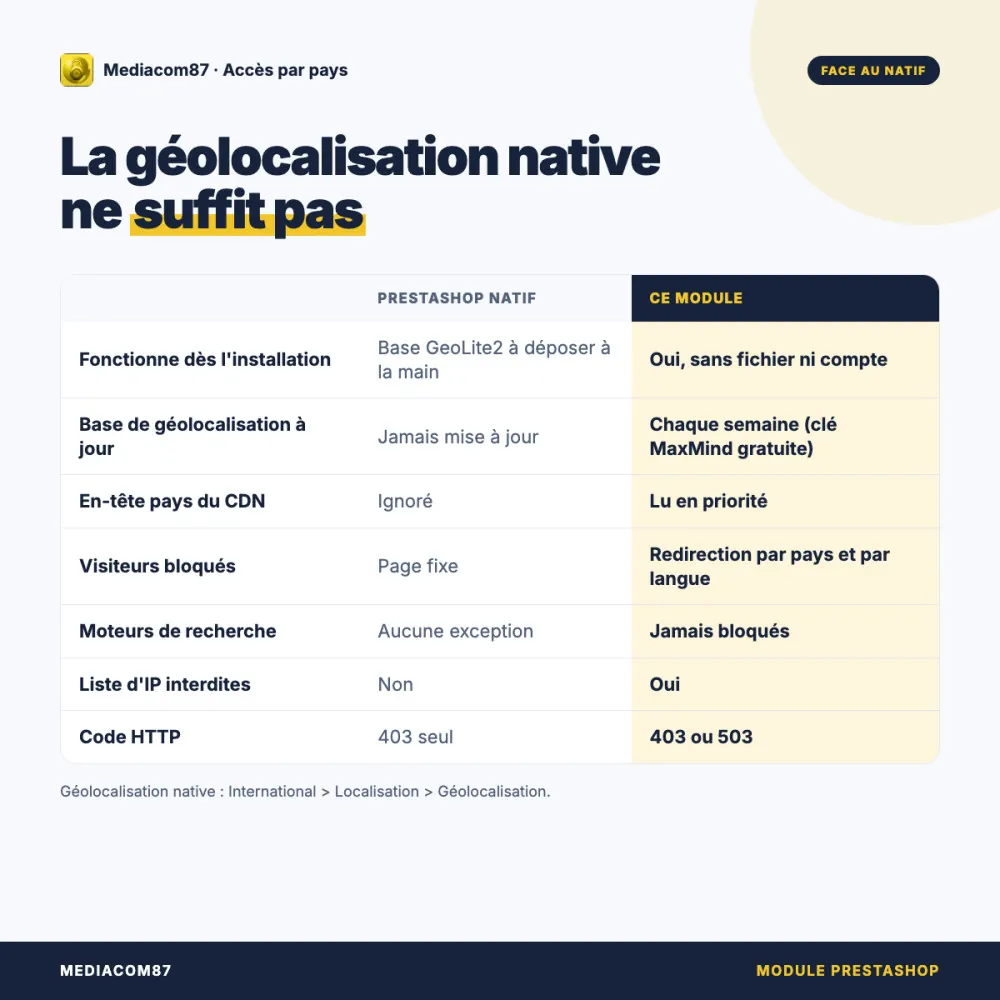
PrestaShop can restrict countries (International > Localization > Geolocation), but stops there.
| Native geolocation | Allow / block access by country | |
|---|---|---|
| Works right after installation | No, GeoLite2 database to upload by hand | Yes, with no file or account |
| Database updates | Never | Every week, with a free MaxMind key |
| CDN country header | Ignored | Read first |
| Blocked visitors | Fixed page | Redirection per country and per language |
| Search engines | No exception | Always allowed |
| List of blocked IP addresses | No | Yes |
| HTTP code | 403 | 503 or 403 |
| Proxies, VPNs and Tor | No | Optional blocking |
Among other country-blocking modules, many require you to download the GeoLite2 database by hand, a MaxMind account or a cron job. Here, all of that is optional. There is no need to enable native geolocation alongside this module.
How it works
You choose the countries
In the Countries tab, one click allows or blocks a country, saved instantly.
The module locates the visitor
Your CDN header, the local GeoLite2 database or an online service, in that order.
Each country gets its response
Access, information page or redirection to the address for their language.
Detailed features
Countries
- Allow or block in one click, saved instantly
- Every country known to PrestaShop
- Search, sorting and pagination
- Blocked countries grouped at the top of the list
Blocked visitors
- Information page with your logo
- Redirection per country and per language
- Global redirection for all blocked countries
- HTTP code 503 or 403
Geolocation
- CDN country header (Cloudflare, CloudFront)
- Local GeoLite2 database, updated every week
- ip-api.com service as a last resort
- Access open when the country is unknown
SEO
- Search engine crawlers always allowed
- AI crawlers and social network previews recognised
- Local detection, with no network call
- Option enabled by default
IP addresses
- Always allowed addresses
- Always denied addresses
- Real IP behind a CDN or a proxy
- Optional blocking of proxies, VPNs and Tor
Multistore
- Settings per shop, per group or by default
- Banner showing the settings being edited
- Rules specific to each shop
- Follows the PrestaShop multistore rule
In the back office
- Geolocation self-check
- Built-in FAQ: 22 questions in 6 themes
- Interface and PDF documentation in 6 languages
- No library loaded from an external CDN
Technical
- PrestaShop 1.6 to 9.x, PHP 5.6 and above
- No override of native classes
- No native table modified
- Country cached per visitor
Licence and support
The Mediacom87 licence is included for any customer of a module bought on Addons or PrestatoolBox. It unlocks update notifications and priority support, which you contact straight from the module. Blocking, redirections, geolocation and IP address lists all work without it. Published by Mediacom87, PrestaShop specialist since 2008.
Installation in 4 steps
Install the module from your back office (Modules > Module Manager). Every country stays allowed.
In the Configuration tab, check the country detected for your connection.
In the Countries tab, untick the countries to block and set their redirections with the pencil button.
Block your own country, open the shop in a private browsing window, then allow it again.
Features
- Allow or block in one click, saved instantly
- Every country known to PrestaShop
- Search, sorting and pagination
- Blocked countries grouped at the top of the list
- Information page with your logo
- Redirection per country and per language
- Global redirection for all blocked countries
- HTTP code 503 or 403
- CDN country header (Cloudflare, CloudFront)
- Local GeoLite2 database, updated every week
- ip-api.com service as a last resort
- Access open when the country is unknown
- Search engine crawlers always allowed
- AI crawlers and social network previews recognised
- Local detection, with no network call
- Option enabled by default
- Always allowed addresses
- Always denied addresses
- Real IP behind a CDN or a proxy
- Optional blocking of proxies, VPNs and Tor
- Settings per shop, per group or by default
- Banner showing the settings being edited
- Rules specific to each shop
- Follows the PrestaShop multistore rule
- Geolocation self-check
- Built-in FAQ: 22 questions in 6 themes
- Interface and PDF documentation in 6 languages
- No library loaded from an external CDN
- PrestaShop 1.6 to 9.x, PHP 5.6 and above
- No override of native classes
- No native table modified
- Country cached per visitor
Changelog
v4.6.1
- Fixed: The full list of countries is now shown whatever the countries associated with the shop, so any country can be blocked
- Fixed: Multistore: the settings are now saved at the level being edited (one shop, a shop group or all shops), so each shop keeps its own country rules and a saved change is shown again after a reload
- Fixed: Multistore: on PrestaShop 8, the page now shows and saves the settings of the shop selected in the shop selector, so a country allowed again for a single shop no longer reverts to forbidden after a reload
- New feature: Multistore: a banner states which shop, shop group or default settings are being edited
- New feature: Countries tab: a button deletes the custom redirections still stored for an allowed country
- The external DataTables library is no longer used: the country list now relies on the built-in Mediacom87 table, with sorting, search and paging, and no third-party script loaded
- FAQ rewritten and grouped by theme, with links to the PrestaShop multistore documentation and to the geolocation services
v4.6.0
- New feature: New geolocation chain: the country header of your CDN (Cloudflare...), then a local GeoLite2 database, with the online service only used as a last resort (over HTTPS when a key is provided)
- New feature: Optional local GeoLite2 database, downloaded and updated automatically from a free MaxMind key
- Search engine crawlers are now recognised by the module itself, with no external service, so your indexing is never at risk
- New "fail-open" option: access is allowed when the country cannot be determined, so the shop is never locked by mistake
- Support for shops behind a CDN or a reverse proxy: the real visitor address is read from the forwarded headers
- Fixed: Saving the Countries tab no longer erases the redirections defined per country
v4.5.1
- Bug fix for PrestaShop 1.6
- DataTables library updated to version 2.3.8
v4.5.0
- Added compatibility with PrestaShop 9
- Complete code rewrite to improve performance and reduce calls to the control services
- DataTables library updated to version 2.3.3
v4.4.0
- Fixed a display error in Firefox
- Improved presentation of the country list
- Changes to country access are saved instantly
- DataTables library updated to version 2.0.5
v4.3.0
- Added compatibility with PrestaShop 8
- Improved user experience
- Added a list of IP addresses to block
- Added an option to block all connections made through a proxy, a VPN or the Tor network
- Visitor cookies are reset after every settings change
v4.2.1
- Improved handling of changes made in the sortable country table
- Fixed the display of the number of custom redirections defined per country
v4.2.0
- Complete overhaul of the management methods
- Improved overall performance
v4.1.0
- Redesign of the back office
- Bug fix for PrestaShop 1.7
- Added an option to manage search engine crawlers
- Fixed an encoding bug in the friendly URL of the replacement page
v4.0.1
- Performance improvement
v4.0.0
- Complete redesign of the module code
- Additional security
- Added a list of always allowed IP addresses
- Performance improvement
v3.2.0
- Added a custom redirection per country
Customer reviews · 2 verified reviews
A project, a question, an audit?
Personal reply within 24 working hours. No strings attached.
Let's discuss your project →